PB430.007 /02-17-94 |0| Copyright 1991-1994 Packard Bell Electronics
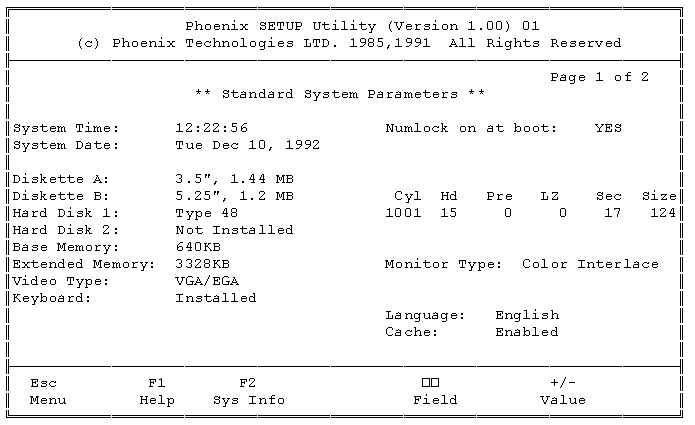
PB430/440/440T SETUP SCREEN
NOTE:
Press <Ctrl>-<Alt>-<S> immediately after the post beep to get into setup. This is an example only; actual configuration may vary.
1. PAGE 1 SETUP MENU
2. PAGE 2 SETUP MENU
A. PAGE 2 SETUP MENU SCREEN
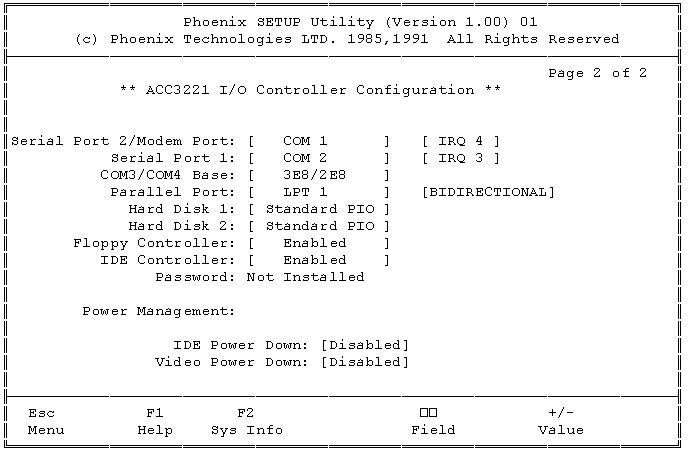
B. PAGE 2 SETUP MENU OPTIONS
NOTE: When setting the Programmed I/O (PIO) for Hard Disk 1/2 make sure that the installed hard drive supports Read/Write Multi (multiple reads/writes). If the hard drive does NOT support Read/Write Multi, leave Hard Disk 1/2 set to Standard PIO.
| Serial Port 2/Modem Port: | COM 1 COM 2 COM 3 COM 4 |
IRQ3 IRQ 4 |
| Serial Port 1: | COM 1 COM 2 COM 3 COM4 |
IRQ 3 IRQ 4 |
| COM3/COM4 Base: | 3E8/2E8 338/238 220/228 E8/3E8 |
|
| Parallel Port: | LPT 1 LPT 2 LPT 3 |
Bidirectional Output only Disabled |
| Hard Disk 1: | Standard PIO 2/4/8/16 Blk Auto Blk |
|
| Hard Disk 2: | Standard PIO 2/4/8/16 Blk Auto Blk |
|
| Floppy Controller: | Enabled Disabled |
|
| IDE Controller: | Enabled Disabled |
|
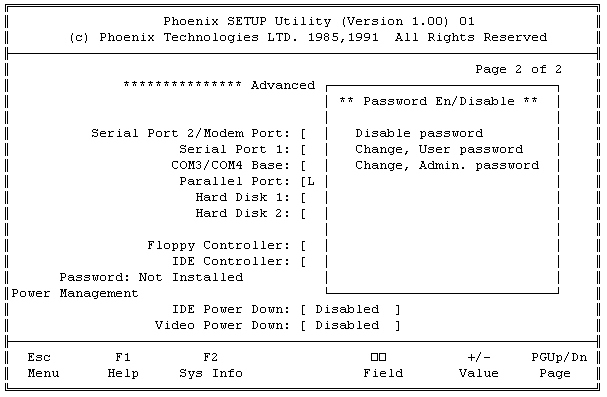
| Password | Disable password Enable BOOT password Enable SETUP password Enable Boot/Setup password Change User password Change Admin. password |
|
| IDE Power Down: | Disabled 1/2/5/10/15/20/Max Min |
|
| Video Power Down: | Disabled |
3. SYSTEM INFORMATION SCREEN (F2 OPTION)
Packard-Bell is a trademark of Packard Bell/NEC. This author and the service provider are not affiliated with Packard-Bell/NEC in any way