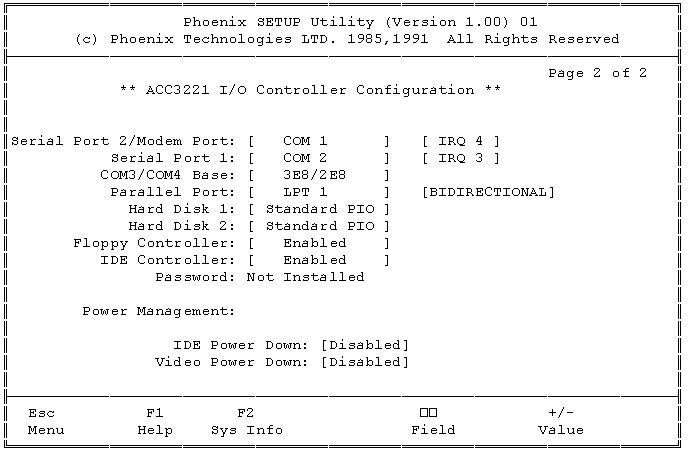
PB430.014 /05-24-94 |0|
Copyright 1991-1994 Packard Bell Electronics
PB430: SETTING PASSWORDS
NOTE: Enabling the "User password" prevents unauthorized users
from booting the system. Enabling the "Admin. password" prevents
unauthorized users from entering setup. Both passwords may be enabled at the same
time.
4. Hit the gray <+> key. On the top right corner of the screen, an
orange box will appear with the following options:
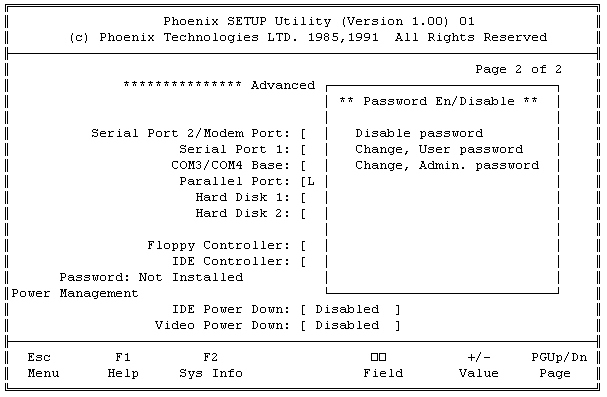
5. To prevent unauthorized users from gaining access when booting the system:
Choose Change, User password. Press <Enter>. Type a password, up to seven letters. Press <Enter>. Re-type the password again. Press <Enter>.
6. To prevent unauthorized users from gaining access to the Phoenix SETUP Utilities screens:
Choose Change, Admin. password. Press <Enter>. Type a password, up to seven letters. Press <Enter>. Re-type the password again. Press <Enter>.
7. Press the <Esc> key. A blue options box will appear on the right side of the screen. Press the <F4> key to save the changes and reboot the system.
The system will now reboot. Depending on the enabled options, the system will prompt for a password either during the startup process, when accessing the setup screens, or both.
Packard-Bell is a trademark of Packard Bell/NEC. This author and the service provider are not afilliated with Packard-Bell/NEC in any way